


Does the 2026 Hyundai KONA have wireless Apple CarPlay for Glendale Heights, IL drivers?
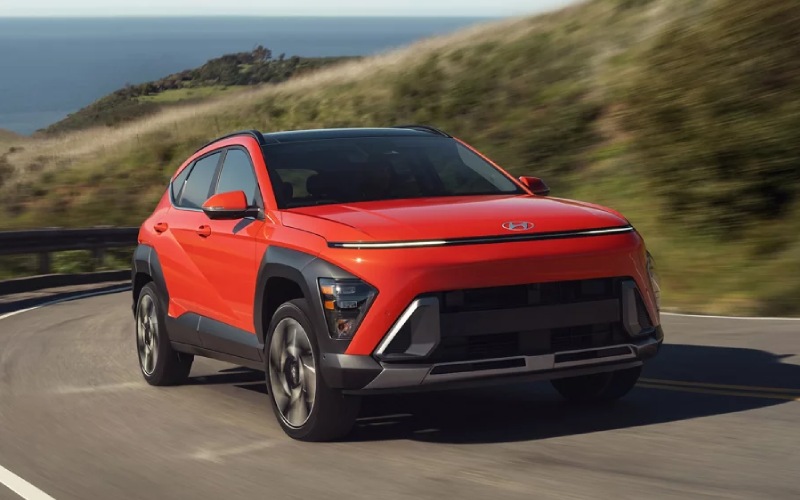
Patrick Hyundai – Does the 2026 Hyundai KONA have wireless Apple CarPlay for Glendale Heights, IL drivers?
Shopping for a compact SUV that blends the right-size cabin with must-have tech can feel like a balancing act. If you rely on iPhone apps to navigate, queue up podcasts, and message hands-free, you’re probably asking whether the 2026 Hyundai KONA includes wireless Apple CarPlay®—and how well it works day to day around Glendale Heights, IL. The great news is that wireless Apple CarPlay® and Android Auto™ are standard across every 2026 KONA trim, so you can leave the cables at home and focus on the drive.
Beyond simply checking the box, Hyundai designed the KONA’s interface around a generous 12.3-inch touchscreen display that’s crisp, responsive, and easy to reach. That means your go-to apps feel natural to use, traffic reroutes are easier to follow, and audio controls are less distracting. Let’s walk through how this setup improves everyday driving, which trims to look at if you want more screen integration, and a few tips to make the whole experience seamless.
What wireless Apple CarPlay® brings to your daily drive
Wireless Apple CarPlay® mirrors many of your iPhone’s most helpful apps on the KONA’s standard 12.3-inch touchscreen—no plugging in required. Your preferred maps, turn-by-turn directions, playlists, and call history appear in a clean, familiar layout. The lack of cables tidies up the cabin and makes short trips easier since there’s nothing extra to connect for a quick errand or school pickup. Voice control via Siri helps minimize distractions, letting you adjust routes, change music, or send a text by voice while you keep your eyes forward.
For Android users, wireless Android Auto™ is also standard. The KONA’s large screen and simple menus make the experience equally straightforward, so no one misses out on seamless phone integration just because of device preferences.
How it’s implemented on the 2026 KONA
Hyundai didn’t just add wireless smartphone projection and call it a day. The KONA’s 12.3-inch touchscreen display provides room for larger maps and bolder icons, which lowers the effort needed to glance, confirm, and return your focus to traffic. On higher trims, the available 12.3-inch instrument cluster complements the center screen by placing vehicle and route information right where you want it. The overall effect is a cohesive, minimal-effort cockpit that makes getting around the West Army Trail Road and North Avenue corridors feel more relaxed, even during busy periods.
If you like your cabin to stay cable-free, look to SEL Sport and above for available wireless device charging. Drop your compatible phone on the pad, and it replenishes while your apps stay connected wirelessly. It’s a small thing that adds up to a cleaner, calmer driving environment.
Setup tips for a smooth first connection
Pairing your phone for the first time is simple, and a few best practices help you get the most out of it from day one.
- Start with Bluetooth and Wi-Fi on: Make sure both are enabled on your iPhone before you begin pairing in the KONA’s settings.
- Follow the prompts: The 12.3-inch touchscreen walks you through connecting Apple CarPlay®; accept the prompts on both the vehicle and your phone.
- Enable contacts and messages: Allow access so you can make calls and send messages by voice without touching your phone.
- Customize your app order: Arrange your CarPlay home screen so your most-used apps are front and center for faster access.
- Save your driver profile: If the KONA you’re driving supports profiles, saving one keeps your CarPlay settings consistent.
Once paired, the KONA typically reconnects automatically whenever you start the engine. If you ever switch between devices, you can select your preferred phone in the vehicle’s Bluetooth settings with just a couple of taps.
Which trims to consider if you want even more tech
Every 2026 KONA includes the 12.3-inch touchscreen with wireless Apple CarPlay® and Android Auto™, so you won’t miss out on the essentials at any trim level. If you want extras that complement phone integration, SEL Sport adds wireless device charging, and SEL Premium brings H-Tex® trimmed seats and ambient interior lighting to elevate the cabin ambiance during evening drives. Limited layers on premium driver assists and parking tech—Surround View Monitor (SVM), Blind-Spot View Monitor (BVM), Highway Driving Assist (HDA), and Remote Smart Parking Assist (RSPA)—so navigating, changing lanes, and parking feel smoother all around.
No matter how you spec your KONA, the standard wireless smartphone integration pairs naturally with Hyundai’s interface. That’s the real advantage: tech that feels cohesive rather than bolted on.
How this helps around Glendale Heights, IL
Between neighborhood streets and arterial routes like North Avenue and Glen Ellyn Road, a compact SUV with polished tech is simply easier to live with. The KONA’s wireless Apple CarPlay® lets you glance at up-to-date traffic, reroute around backups, and keep your playlist going without fumbling for a cable at each stop. When you park for a quick coffee or grocery run, you just turn the vehicle off and go—no unplugging required. If you’re sharing the KONA with another driver in the household, quick device switching keeps the experience consistent for everyone.
For those who split time across Glendale Heights, Schaumburg, and Mount Prospect, the KONA’s available HTRAC All Wheel Drive, standard Smart Cruise Control (SCC) with Stop & Go, and available Highway Driving Assist (on Limited) stack confidently with wireless CarPlay—so your smartphone smarts and your vehicle’s driver assists feel like one integrated system.
How Bluelink+ fits into the picture
Wireless Apple CarPlay® handles on-the-go entertainment and navigation, while Bluelink+ takes care of life around the drive. Hyundai’s connected car service lets you lock or unlock doors and remotely start your new Hyundai from a compatible smartphone. At no extra cost to you, Bluelink+ complements smartphone projection by covering the tasks you want to do from outside the cabin—helpful when you’re juggling kids, groceries, or both. It’s another example of Hyundai’s thoughtful approach to real-life ownership.
Frequently Asked Questions:
Is wireless Apple CarPlay® standard on every 2026 KONA?
Yes. Wireless Apple CarPlay® and Android Auto™ are standard across the lineup, displayed on a 12.3-inch touchscreen.
Do I need a special cable or adapter?
No. The KONA supports wireless connectivity natively, so you can leave your cable at home. If you prefer to charge by wire, you can still plug in.
Will it reconnect automatically each drive?
After the first pairing, the KONA typically reconnects to your iPhone automatically when you start the vehicle, as long as Bluetooth and Wi-Fi are enabled on your phone.
Which trim adds wireless device charging?
Wireless device charging is available starting with SEL Sport and above. It’s a convenient add-on if you want to keep the cabin free of cables.
When you want a compact SUV that keeps daily driving simple and connected, the 2026 Hyundai KONA delivers. The big screen, painless pairing, and thoughtful menu design make wireless Apple CarPlay® feel like second nature, not another system to learn. If you’re ready to try it first-hand, stop by for a test drive and pair your phone—you’ll know within minutes whether it fits your routine. For guidance and a tailored walk-through, Patrick Hyundai is serving Glendale Heights, Schaumburg, and Mount Prospect with product specialists who can demo features side by side and answer setup questions on the spot.

0 comment(s) so far on Does the 2026 Hyundai KONA have wireless Apple CarPlay for Glendale Heights, IL drivers?