


Does Hyundai SmartSense on the 2026 Tucson make commuting easier around Rolling Meadows, IL?
Patrick Hyundai – Does Hyundai SmartSense on the 2026 Tucson make commuting easier around Rolling Meadows, IL?
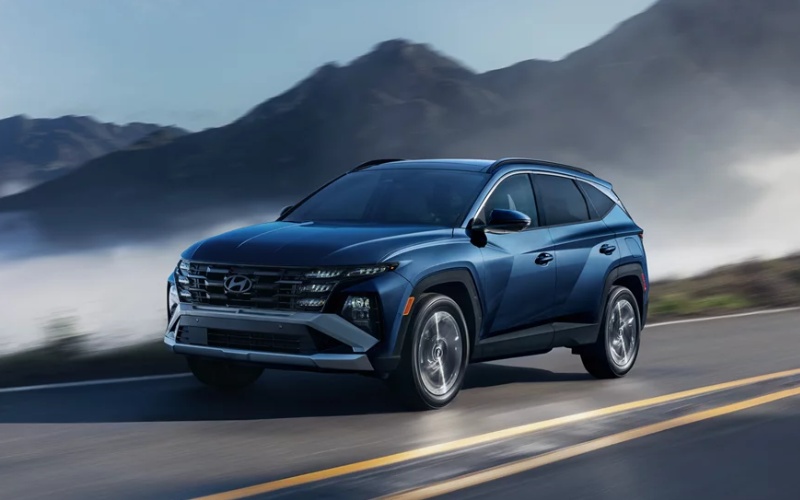
Safety technology has advanced so much that shoppers now want to know not just what a system is called, but how it genuinely helps on a daily drive. Hyundai SmartSense on the 2026 Tucson stands out because it layers awareness and gentle assistance in a way that feels natural once you try it. If your commute includes arterial roads with frequent merges, a section of I-90, or neighborhood streets with cross traffic, the Tucson’s standard and available systems work together to support smooth, confident driving without feeling intrusive.
Think about the moments that increase your workload behind the wheel—stop-and-go queues, sudden slowdowns, lane drift from fatigue, cars tucked into your blind spots, or tight parking at a crowded fitness center. Tucson addresses those moments with standard Forward Collision-Avoidance Assist, Lane Keeping Assist, Lane Following Assist, Driver Attention Warning, and Rear Cross-Traffic Collision-Avoidance Assist. On select trims, Smart Cruise Control with Stop & Go, Smart Cruise Control 2, Highway Driving Assist, and Navigation-based Smart Cruise Control with Curve Control reduce the grind of steady highway stretches and adjust speed proactively for posted zones and curves. Available Blind-Spot View Monitor and Surround View Monitor add a new layer of confidence when changing lanes or easing into a narrow space. The result is a calmer, more consistent drive that helps you arrive feeling fresher.
Daily ease is about thoughtful integration, too. The 12.3-inch touchscreen is standard, and the available panoramic curved display pairs it with a 12.3-inch digital instrument cluster, so alerts and guidance are presented where your eyes naturally go. That means you can view Forward Collision-Avoidance Assist warnings or Smart Cruise Control status without distraction. Wireless Android Auto™ and Apple CarPlay® simplify your routine with voice-guided navigation and hands-free messaging, while Bluelink+ lets you prepare the cabin before you head out. It all contributes to a polished experience that complements SmartSense rather than competing with it.
Drivers who regularly travel at variable speeds tend to appreciate how Smart Cruise Control with Stop & Go behaves in traffic. Set a speed and following distance, and Tucson can help manage the ebb and flow—down to a stop, then back up to speed as traffic moves. Step up to Smart Cruise Control 2 and Highway Driving Assist on select trims and Tucson can add lane centering and, when combined with Navigation-based Smart Cruise Control with Curve Control, proactively modulate speed for curves or speed-controlled zones. These features do not replace your attention, but they can meaningfully reduce fatigue on longer trips.
Parking and lane changes are two situations where confidence matters as much as convenience. The available Blind-Spot View Monitor shows a live camera feed in the digital instrument cluster when you signal, making it easier to confirm a clear lane. Available Surround View Monitor stitches multiple camera angles into a 360-degree bird’s-eye view, which is incredibly helpful in a tight garage or a busy lot near a grocery store. If you want an extra assist in a narrow space, the available Remote Smart Parking Assist can move Tucson forward or backward using the Smart Key while you guide it from outside.
Local commuting doesn’t always mean highways. Neighborhood drives around schools or parks demand attention to speed and surroundings. Tucson’s High Beam Assist handles headlight toggling, while Driver Attention Warning can prompt a break if it senses behavior that suggests fatigue. Safety is not just about emergencies—it is about the small, smart reminders that add up to smoother, safer habits.
Shoppers around the northwest suburbs frequently ask whether the drive-assist features feel “too hands-on.” The best way to learn is with a thoughtful test drive that includes a mix of routes: a few stoplights, a brief stretch of highway, and a parking scenario. Try Smart Cruise Control on a clearly marked road, engage lane assistance where appropriate, and then park in a spot you typically find challenging. You will leave with a clear sense of how these systems could help on your exact commute.
If you are comparing SUVs, note how well Tucson’s assist features integrate with the rest of the cabin experience. The available panoramic curved display presents relevant indicators alongside speed and navigation, and the overall interface minimizes taps and swipes. That matters every day, especially when you are managing a busy schedule and want technology that simply works.
When you are ready to see how SmartSense and the rest of Tucson’s technology fit your routine, we are happy to set up a drive that mirrors your daily routes and conditions. It is the fastest way to understand these systems in a real-world context and decide which trim offers the right mix of features for you.
Frequently Asked Questions:
Which Safety features are standard on every 2026 Tucson?
Forward Collision-Avoidance Assist, Lane Keeping Assist, Lane Following Assist, Driver Attention Warning, High Beam Assist, and Rear Cross-Traffic Collision-Avoidance Assist are standard across the lineup, with more advanced systems available on select trims.
Do I need special roads to test Highway Driving Assist or Smart Cruise Control?
You will want clearly marked lane lines and a steady stretch of road to evaluate lane centering and adaptive cruise behavior. We can plan a route that safely demonstrates these features so you can experience them first-hand.
How does Surround View Monitor help in tight spaces?
It combines multiple cameras to show a 360-degree bird’s-eye view plus selectable close-ups, making it much easier to line up within the lines or avoid low obstacles that can be hard to see from the driver’s seat.
Can I pair my phone and still use the driver-assistance features?
Yes. Wireless Android Auto™ and Apple CarPlay® integrate seamlessly with the driver-assistance systems. Alerts and status messages appear in the cluster and on the touchscreen, while your apps remain easy to access.
If you would like a walk-through that puts these features to work on roads you know well, Patrick Hyundai is here to help, serving Mount Prospect, Rolling Meadows, and Crystal Lake. We will tailor a route, set up the systems with you, and answer questions as you drive so you can make a confident decision about your next SUV.

0 comment(s) so far on Does Hyundai SmartSense on the 2026 Tucson make commuting easier around Rolling Meadows, IL?