


Can I use Hyundai Digital Key 2 Touch with the 2026 Hyundai TUCSON around Bloomingdale, IL?
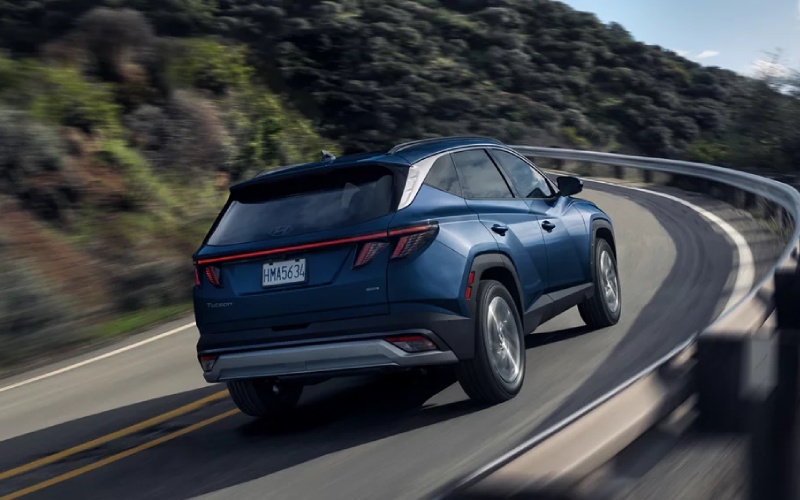
Patrick Hyundai – Can I use Hyundai Digital Key 2 Touch with the 2026 Hyundai TUCSON around Bloomingdale, IL?
Hyundai Digital Key 2 Touch brings a new layer of everyday convenience to the 2026 Hyundai TUCSON by allowing compatible smartphones and smartwatches to function as your key. Around Bloomingdale, IL — where quick stops at Stratford Square, early-morning gym visits on Army Trail Road, and shared-vehicle routines are common — the ability to lock, unlock, and even start your TUCSON with a tap can save time and simplify life.
This guide explains what Digital Key 2 Touch is, how it works on eligible TUCSON trims, which devices are compatible, and how to set it up with the MyHyundai app and Bluelink+. You will also learn how to securely share and manage access for family members, roommates, or colleagues who occasionally drive your SUV.
What Hyundai Digital Key 2 Touch Does
Digital Key 2 Touch lets compatible devices serve as your vehicle key via near-field communication. Tap your phone or smartwatch at the driver’s door handle to unlock, then place it on the wireless charging pad or designated NFC area and press the start button. You can create and manage multiple keys, set usage limits, and revoke access at any time through the MyHyundai app — a big help for households with varied schedules or shared parking at busy apartment communities.
Device Compatibility and Requirements
Digital Key 2 Touch is available on select 2026 Hyundai TUCSON configurations. Many recent iPhone and Android models with NFC capability are supported. You will use the MyHyundai app to add and manage keys. Because feature availability can vary by trim and device, we recommend bringing your smartphone and smartwatch to the dealership so we can verify compatibility, update software if needed, and walk you through each step.
How to Set Up Digital Key 2 Touch
Setup takes only a few minutes when you have the right items on hand. Plan to complete the initial activation while parked safely, then test your new key in a low-traffic area before relying on it day to day.
- Download MyHyundai: Install or open the MyHyundai app and sign in with your Hyundai account.
- Confirm Bluelink+: Ensure Bluelink+ services are active on your TUCSON to enable connected key features.
- Add a key: In the app, navigate to Digital Key and follow prompts to add your phone as a key.
- TAP to pair: Hold the phone at the driver’s handle to complete NFC pairing, then place it on the pad to finalize.
- Test functions: Lock and unlock by tapping the handle, then start the vehicle with your device in place.
Sharing and Managing Access
One of the most useful aspects of Digital Key 2 Touch is secure key sharing. Whether you split driving duties for school pickup or need a coworker to access the cargo area for equipment, you can share and tailor access from your app. Set time windows, choose full-drive or unlock-only permissions, and revoke access instantly if plans change.
- Simple invites: Send a secure invite via the app to a compatible device.
- Custom permissions: Choose the level of access and time frame for each shared key.
- Real-time control: Modify or revoke keys from your phone, even when you are not near the vehicle.
Security You Can Trust
Digital Key 2 Touch uses NFC and app-based authentication designed to help protect against unauthorized access. If your phone is lost, you can quickly revoke the digital key and use your physical key until the device is recovered or replaced. The system is built to complement — not replace — good habits, so keep your device updated and enable screen lock or biometric security on your phone and watch.
Life Around Bloomingdale, IL With Digital Key
From morning classes to an evening grocery run, Digital Key 2 Touch streamlines your routine. Hands full with a takeout order near Bloomingdale Road? A quick tap unlocks the door without fishing for keys. Meeting a friend by the bike path and need to hand off a helmet stored in back? Share temporary access so they can open the hatch while you finish your ride. If you carpool to Schaumburg, sharing a time-limited key keeps you flexible without juggling spares.
How It Fits With the Rest of Your TUCSON Tech
Digital Key 2 Touch complements the TUCSON’s modern digital touchscreen, Apple CarPlay and Android Auto integration, and Hyundai SmartSense driver-assists. Use the app to check vehicle status, then step in and enjoy a calm, connected drive. If you choose available HTRAC All Wheel Drive, your TUCSON pairs real-world capability with an ownership experience that feels thoroughly modern.
Frequently Asked Questions:
Do I still get physical keys with the 2026 TUCSON if I use Digital Key 2 Touch
Yes. You will receive traditional keys and can use them at any time. Digital Key 2 Touch is an available convenience feature on select trims that adds flexible access alongside your physical keys.
What happens if my phone battery dies while I am out
Carry your physical key as a backup on longer days. If your phone battery is low, charge it briefly via a portable battery pack or inside the TUCSON once you gain access with your physical key. You can also add a compatible smartwatch as an additional digital key for extra peace of mind.
Can multiple household members set up their phones as keys
Yes. You can create multiple digital keys and set custom permissions for each person. Manage all keys from the MyHyundai app, including revoking access when schedules or drivers change.
Is Digital Key 2 Touch available on every 2026 TUCSON trim
Availability varies by configuration. We will confirm the feature content on the exact TUCSON you are considering and demonstrate setup during your visit.
If you are comparing compact SUVs around the western suburbs, Digital Key 2 Touch is one more way the TUCSON makes daily driving easier. Visit Patrick Hyundai — serving Rolling Meadows, Crystal Lake, and Bloomingdale — to see how Digital Key fits into your life, try the setup with your own device, and explore the rest of the TUCSON’s technology and driver-assistance features with a friendly, guided walk-through.

0 comment(s) so far on Can I use Hyundai Digital Key 2 Touch with the 2026 Hyundai TUCSON around Bloomingdale, IL?