


Can I use Hyundai Digital Key 2 Touch on the 2026 Hyundai ELANTRA with my iPhone around Elk Grove Village, IL?
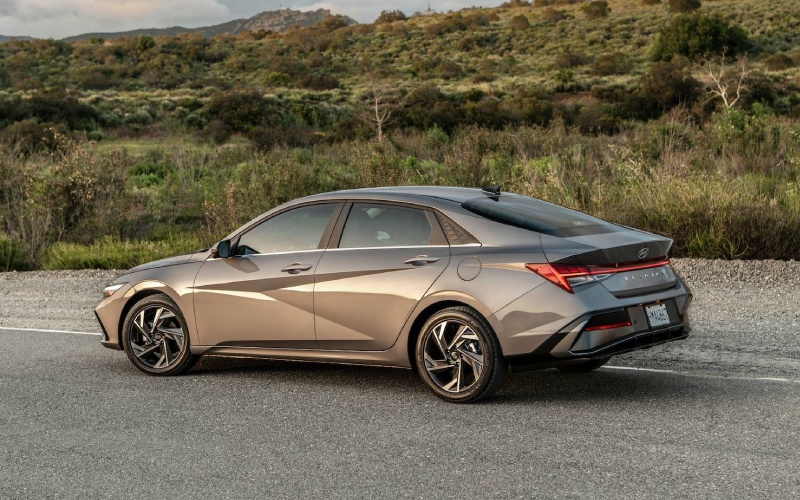
Patrick Hyundai – Can I use Hyundai Digital Key 2 Touch on the 2026 Hyundai ELANTRA with my iPhone around Elk Grove Village, IL?
Hyundai Digital Key 2 Touch is one of those smart conveniences that quickly becomes part of your routine, and on the 2026 Hyundai ELANTRA, it’s available on select trims and standard on Hybrid Limited. If you live or work around Elk Grove Village, IL and juggle keys, gym bags, and a busy calendar, being able to lock, unlock, and start the sedan with a compatible smartphone or card key feels like a small luxury that saves real time.
This guide explains what Digital Key 2 Touch does on the 2026 ELANTRA, which trims to look at, how it works with Bluelink+, and practical tips for everyday use. You’ll also find pointers for test driving so you can try it firsthand before you decide which trim fits best.
How Digital Key 2 Touch works on ELANTRA
Hyundai Digital Key 2 Touch lets you use a compatible smartphone or card key in place of your traditional key fob. Once set up, you can hold your phone or card key near the door handle to lock or unlock, and then place it at the designated area to start the vehicle. It’s secure, simple, and integrated with the MyHyundai with Bluelink app, so managing access settings happens right from your device. If you’ve ever fumbled for keys outside a fitness studio or after a grocery run near the industrial corridors and shopping hubs around Elk Grove Village, IL, this is the kind of feature that streamlines those last few steps.
On the 2026 ELANTRA, Digital Key 2 Touch pairs naturally with other cabin tech. Apple CarPlay® and Android Auto™ let you transition from unlocking the car to playing a podcast or taking a call on the go. Available Wi-Fi hotspot capability and a wireless Qi-compatible charging pad keep your phone charged and your cabin clutter-free. The result is a connected experience that respects your time.
Trim availability and setup basics
Digital Key 2 Touch is standard on Hybrid Limited and available on select other configurations. If you’re focused on tech-forward convenience, put Hybrid Limited at the top of your list. After delivery, setup involves pairing your ELANTRA and compatible device through the MyHyundai with Bluelink app, confirming permissions, and enrolling your card key as a backup. Your product specialist can walk you through those steps at delivery; the process is designed to be straightforward and secure.
Because Digital Key 2 Touch is part of a broader connected experience, it’s helpful to think of your goals up front. Do you want to share access with a partner who also drives? Would you prefer to rely on the card key during workouts? Do you plan to keep the traditional fob as a fallback? These answers make configuration fast and frustration-free.
Everyday scenarios where Digital Key 2 Touch shines
Once you’ve lived with Digital Key 2 Touch for a few days, you’ll find it fits right in with daily life around the Northwest Suburbs. Consider these common moments where the feature adds real value:
- Hands full at pickup: With a backpack and laptop in one hand, tap your phone at the handle to unlock—no digging for a fob in the back pocket.
- Shared driving made simple: If you and a partner split weekdays and weekends, manage access through the app so both of you can hop in and go.
- Card key at the gym: Traveling light? Keep the card key in a small wallet for a quick tap-to-unlock routine after class.
- Backup confidence: If your phone battery runs low, the card key or traditional fob gives you an instant fallback.
Paired with ELANTRA’s available Dual 10.25-inch Displays, it’s easy to glance at remaining phone charge, swap audio sources, and hit the road. The experience is cohesive and reassuring without feeling complicated.
How it complements Hyundai SmartSense
Digital Key 2 Touch doesn’t work in isolation—it’s part of a larger system that includes Hyundai SmartSense driver-assistance features. Standard technologies like Forward Collision-Avoidance Assist with Pedestrian Detection (FCA-Ped), Lane Keeping Assist (LKA), Lane Following Assist (LFA), Blind-Spot Collision Warning (BCW), and Rear Cross-Traffic Collision-Avoidance Assist (RCCA) help relieve stress once you’re underway. On Limited, Highway Driving Assist (HDA) supports smoother highway miles. Together, these technologies reduce the number of small decisions you need to make and the number of items you need to carry—freeing up your attention for what matters most.
Test drive tips to evaluate Digital Key 2 Touch
Trying the feature yourself is the fastest route to clarity. Here’s a simple approach that works well for in-market shoppers:
- Confirm the trim: Ask to see Hybrid Limited and verify that Digital Key 2 Touch is active on the demo vehicle.
- Walk-through setup: Have a specialist show the pairing flow in the MyHyundai with Bluelink app and demonstrate the card key tap.
- Practice the tap: Try unlocking and starting several times; it becomes second nature in minutes.
- Pair with cabin tech: Launch Apple CarPlay® or Android Auto™ and set up a wireless charging routine that fits your phone.
- Drive your routine: Map a loop similar to your Elk Grove Village, IL errands or commute and see how everything flows in real time.
That sequence ensures you can picture how the feature would work tomorrow morning, not just in the showroom. It also helps you decide whether you prefer to rely on your phone or use the slim card key as an everyday solution.
What else to evaluate while you’re here
Because Digital Key 2 Touch is often part of a tech-savvy wish list, consider trying these adjacent features on your drive: the available Dual 10.25-inch Displays for a panoramic, modern interface; Smart Cruise Control (SCC) with Stop & Go on SEL Sport Premium or Limited; and Bose® Premium Audio for a richer soundstage during longer drives. If you want more engagement, compare an N Line drive to Hybrid Limited. The N Line’s 1.6L Turbo GDI 4-cylinder with a 7-speed DCT and multi-link rear suspension makes backroads more rewarding while still feeling composed around traffic lights and lane changes.
Final thoughts for local shoppers
Hyundai Digital Key 2 Touch adds day-to-day convenience to a sedan already packed with thoughtful tech. On the 2026 ELANTRA, it works hand-in-glove with Bluelink+, Apple CarPlay®, Android Auto™, and available wireless charging to keep your cabin clutter-free and your routine streamlined. If your week runs through fitness classes, office stops, and errands around Elk Grove Village, IL, it’s the kind of feature you’ll use without thinking about it.
When you’re ready to try it, Patrick Hyundai is serving Villa Park, Elk Grove Village, and Streamwood with hands-on demos, clear trim guidance, and test routes that mirror your schedule. Bring your phone, your questions, and your daily checklist—we’ll handle the details so you can focus on how the 2026 ELANTRA fits your life.

0 comment(s) so far on Can I use Hyundai Digital Key 2 Touch on the 2026 Hyundai ELANTRA with my iPhone around Elk Grove Village, IL?